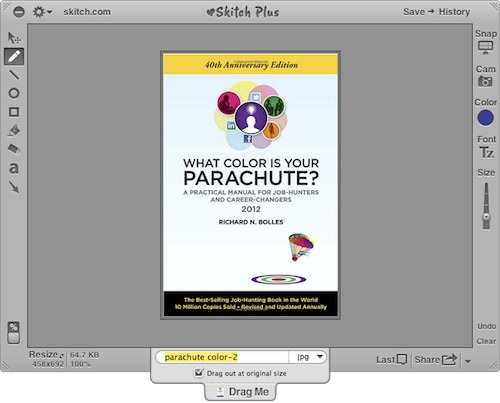
{"id":6230,"date":"2012-06-13T07:00:35","date_gmt":"2012-06-13T00:38:35","guid":{"rendered":""},"modified":"2012-06-13T06:48:46","modified_gmt":"2012-06-13T00:48:46","slug":"skitch","status":"publish","type":"post","link":"https:\/\/kk.org\/cooltools\/skitch\/","title":{"rendered":"Skitch"},"content":{"rendered":"<p>Skitch is a free OSX (and iOS\/Android) screen capture application that I use on a daily basis while editing Cool Tools. Like other screenshot utilities, Skitch allows you to capture the entire screen, a specific window, or drag a selection box across a specific portion of the screen. Skitch&#8217;s selection box features crosshairs that function as a loupe to show you what you&#8217;re capturing on a pixel level which makes capturing exactly what you want very easy. I am particularly fond of other touches like the ability to drag the image in order to export\/resize to the desktop or a particular folder. <\/p>\n<p>Once you&#8217;ve captured your image, Skitch features a host of useful tools like drawing, text editing, shapes, easy resizing, and a number of export options. Sharing, in particular, is well implemented, and allows you to either upload directly to Skitch&#8217;s servers, or to your own FTP, WebDav, and Flickr account. Given that Skitch was recently acquired by the previously reviewed Evernote, it also features solid integration with another of our favorite applications.<br \/>\n<img loading=\"lazy\" alt=\"Skitch Screen.jpg\" src=\"\/wp-content\/archiveimages\/Skitch%20Screen.jpg\" width=\"500\" height=\"403\" class=\"mt-image-none\" style=\"\" \/><br \/>\nIn the past I&#8217;ve used other screen capture applications like the lightweight Capture Me, Apple&#8217;s Grab, and the traditional screen capture via hotkeys, but nothing has come close to the ease of use and function of Skitch. While Skitch isn&#8217;t available on PCs, they have developed stand-alone apps for iOS and Android, however, it really shines on the desktop. <\/p>\n","protected":false},"excerpt":{"rendered":"<p>Powerful screen capture tool<\/p>\n","protected":false},"author":33,"featured_media":0,"comment_status":"open","ping_status":"0","sticky":false,"template":"","format":"standard","meta":{"_monsterinsights_skip_tracking":false,"_monsterinsights_sitenote_active":false,"_monsterinsights_sitenote_note":"","_monsterinsights_sitenote_category":0},"categories":[32],"tags":[],"acf":[],"_links":{"self":[{"href":"https:\/\/kk.org\/cooltools\/wp-json\/wp\/v2\/posts\/6230"}],"collection":[{"href":"https:\/\/kk.org\/cooltools\/wp-json\/wp\/v2\/posts"}],"about":[{"href":"https:\/\/kk.org\/cooltools\/wp-json\/wp\/v2\/types\/post"}],"author":[{"embeddable":true,"href":"https:\/\/kk.org\/cooltools\/wp-json\/wp\/v2\/users\/33"}],"replies":[{"embeddable":true,"href":"https:\/\/kk.org\/cooltools\/wp-json\/wp\/v2\/comments?post=6230"}],"version-history":[{"count":0,"href":"https:\/\/kk.org\/cooltools\/wp-json\/wp\/v2\/posts\/6230\/revisions"}],"wp:attachment":[{"href":"https:\/\/kk.org\/cooltools\/wp-json\/wp\/v2\/media?parent=6230"}],"wp:term":[{"taxonomy":"category","embeddable":true,"href":"https:\/\/kk.org\/cooltools\/wp-json\/wp\/v2\/categories?post=6230"},{"taxonomy":"post_tag","embeddable":true,"href":"https:\/\/kk.org\/cooltools\/wp-json\/wp\/v2\/tags?post=6230"}],"curies":[{"name":"wp","href":"https:\/\/api.w.org\/{rel}","templated":true}]}}