






Grades App

grades-app.jpg

When I went back to college, I found one of the hardest things to deal with was trying to figure out where my grade stood in any particular class. Did the professor do weighted grades? Point system? What score did I get on that last test? Did I calculate in that extra credit? Is the score written on my test and the one in the professor’s grade book the same?

Before I found Grades, I tried the two other student organizer apps on the Android Market. One was only really good at keeping track of my attendance and my overall GPA, the other ended up being useless to me because it could only handle weighted (each category is a percent of the grade) scoring. While the developer was nice enough, he/she didn’t understand that I needed it to be point based (earned / total points = % score).

In a last ditch effort, I did another search and found a new app was added to the Market called Grades: Student Organizer. That was almost 2 semesters and a summer intersession ago and I haven’t looked back!

Grades is able to calculate the student’s GPA, how many units have been taken, grade in each class, and can customize each class individually in either weighted or point-based grading systems.

grades-app2.jpg

Their customer service is wonderful, too. I’ve emailed them several times with problems and suggestions to add to the app and each time I’ve gotten a response usually within a day and even a few of my suggestions were included in the following release (though I suppose that’s more of a Great Minds Think Alike thing).

At the time, I had tried literally every other student gradebook application out there on the Android Market and this one did everything I needed and in the end had everything else the other applications offered. At only $0.99, it’s also the cheapest.

-- Nyx Goldstone  

Grades: Student Organizer
Android application
$1

Available from Android Market Produced by Android Infinity


Three Great Anatomy Books

anitomicalcharts.jpg

The Anatomical Chart Series by Peter Bachin and Ernest Beck is a flip-page guide that includes excellent anatomical charts. It appears to be out-of-print but you can find it used.

humanbody.gif

The Human Body by Ruth & Bertel Bruun is a great and colorful children’s anatomy book. You can find it used for around $3.

atlashumananatomy.jpg

Of my maybe dozen books on anatomy (always fascinated by what Dr. Henry Bieler author of Food Is Your Best Medicine calls “the magnificent human body”), this is the masterpiece: Atlas of Human Anatomy by Frank Netter.

atlashumananatomy2.jpg

How any one human could do all these exquisite drawings in a lifetime is beyond me. The drawings of the hand are spectacular. There is no descriptive text, so I don’t know if this is the perfect text for helping with self-diagnosis, but this is a reference book anyone interested in the human body should have.

I have an older 4th edition, but they recently released the 5th.

My doctor was using a Grey’s Anatomy, and I sent him a copy of this and he was mightily pleased.

-- Lloyd Kahn  

[Note: You can find Netter's Anatomy in various forms including an iPhone and iPod touch application for those on the go.-- OH]

The Anatomical Chart Series
Peter Bachin and Ernest Beck
Classic Library Edition
$25 (used)
Available used at Amazon

The Human Body Ruth and Bertel Bruun
96 pages
$60
Available used at Abe Books

Atlas of Human Anatomy, Fifth edition
Frank Netter
624 pages
$66
Available from Amazon


Sage Maths

sagemaths.jpg

Sage Maths is free open source software for doing virtually every type of maths you can imagine. Not just numerical maths, but symbolic maths too – you can give Sage an equation and it will tell you what the equation of its integral or differential is, for example. And it will do numerical maths, plot graphs, analyze statistical information and solve equations or sets of equations. In fact, it will do virtually anything mathematical you can think of.

Sage was developed as an open source alternative to commercial systems like Mathematica and Matlab (it has most but not all of the functionality of both) because mathematicians and scientists need to be able to understand and review the algorithms their software uses – something not possible with a closed system.

Originally developed for graduate mathematicians, Sage is now at the stage where it is useful and interesting to professional and hobbyist mechanical and electronic engineers, amateur astronomers, business number crunchers, and people who just want to know more maths than they do. It runs on Linux, Windows and OS X, and lately people have managed to run it on both Apple iThings and Android smartphones.

-- Jonathan Coupe  

Sage Maths
Free

Available from Sage


The 10% Solution

10percent-sm.jpg

I have been using this slim book as an editing tool for several years. By using a global word search on a couple dozen words, and reducing their occurrence in your writing, you can shorten the length of a piece of writing by 10% (or more). I’ve used it and it works extremely well. This is a tool useful to both professional and novice writers.

I have copied the list of words into a text file, which I printed out in a long, thin column and taped to the side of my monitor. Whenever I finish a story, I run the searches and tighten up the text. It helps you find and eliminate passive voice, evasive, wishy-washy prose, and general wordiness.

Like a thesaurus, it must be used with care and attention to the overall impact on your writing. That said, I highly recommend The 10% Solution as a quick and dirty editing tool to help you “write tight”.

-- Amy Thomson  

The 10% Solution
First Edition
Ken Rand
1998, 63 pages
$11

Available from Amazon


Anatomy Trains

AnatomyTrain-cover.jpg

Anatomy Trains is a map of our musculoskeletal anatomy. It’s intended for hands-on and movement bodyworkers but is a great read for anyone interested in structure, whole-systems thinking, and brilliant design. I realized after doing Pilates for a while that I had no idea about anatomical structure and why Pilates was effective. While advocating no particular body/mind discipline, Anatomy Trains allowed me to understand why Pilates works. That was eight years ago; my understanding continues to expand over time.

Author Tom Myers asks a grand question: what would happen if we take a different cut at understanding the muscles and tendons? Instead of cutting against the grain at the ends, what happens when you follow the grain past the individual muscles and tendons and see how long the lines of tension go? Tom creates a set of rules and then starts mapping.

An anatomy expert could research and apply those rules themselves; I just followed along. The results are pretty cool: a map of about a dozen or so long lines of tension in our bodies. Most of them are longer than we are tall; some are almost twice as long. Some lines are roughly linear and some spiral around our torso and leg bones. Some lines are near the skin while some are next to the bones. Tom created a new term for these lines: myofascial meridians. Nobody has ever done this before, but the lines are real: Myers has gone into the lab multiple times with teams of students to dissect these long lines of tension in cadavers.

Myers studied under two remarkable body/mind instructors: Moshe Feldenkrais and Ida Rolf. He also studied under Buckminster Fuller, the great whole-systems engineer of the 20th century. The first chapter of the book, The World According to Fascia, provides a lot of background information for the mappings in the remainder of the book. Myers notes that there are three fractal/pervasive networks in our body: circulatory/chemical, nervous/electrical, and structural/spatial. He notes the elusiveness of the structural network: while we’ve had clear models of the first two for hundreds of years, our fine-grained structural network is still quite elusive. This is whole-systems thinking at its finest: lots of ideas how natural tech connects from the nano-scale to full-size human beings.

Like the great science book Godel, Escher, Bach: An Eternal Golden Braid, this book can be read at many different levels. The first way is just to look at the maps and the supporting drawings and charts. A second way is to read the various side discussions and notes. A third way is to plough straight through the rather dense text. I’ve never read AT from cover to cover, but I’ve gone through most of it and read almost all of the side discussions.

My one criticism of the book: its full title, Anatomy Trains: Myofascial Meridians for Manual and Movement Therapists, is enough to scare off those not in the industry. It is a wonderful and friendly book, but books like this must have a formidable title to be sold to medical/health professionals. The ideas it discusses are right on the edge of our understanding of biological systems, but there is not a milligram of woo-woo.

-- Phil Earnhardt  

[For those interested, here is a link to a 20-page read-only PDF that provides an overview of much of what is included in the book.--OH]

Anatomy Trains
Second edition
Thomas W. Myers
2008, 440 pages
$56

Available from Amazon

Sample Excerpts:

AnatomyTrain1.jpg

*
Humans are not assembled out of parts like a car or a computer. “Body as machine’ is a useful metaphor, but like any poetic trope, it does not tell the whole story. In our modern perception of human movement anatomy, however, we are in danger of making this metaphor into the be all and end all. In actual fact, our bodies are conceived as a whole, and grow, live, and die as a whole- but our mind is a knife.

*

AnatomyTrain2sm.jpg

Tensegrity structures, when stressed, tend to distribute rather than concentrate strain. The body does the same with the result that local injuries soon become global strain patterns.


SelfControl

selfcontrol1.jpeg

Hours can fly by in the blink of an eye when I am surfing the web. In an effort to regain some footing in this battle against distraction I have recently been using a program called SelfControl. This free Mac-only open-source program (there are PC and Linux based alternatives) clamps down on internet usage by selectively turning it off.

SelfControl uses brute force to stop bad online habits. When the timer-based program is activated browsers will act like they aren’t connected to the internet. You can restart your computer, you can quit the program, you can switch browsers, and you can even uninstall the program (be careful, because if you are too invasive you can permanently damage some systems). It doesn’t matter. You are locked out for the allotted amount of time. As such you have to be careful with how you use it. You don’t want to accidentally lock yourself out of the web for 12 hours if you know you have to research an important subject that evening.

Unlike other programs like Freedom which only serve to ban all internet access for a designated amount of time, SelfControl gives you more control over what you want to keep on and off. You can use a “white list” of approved sites or a “black list” of banned ones. Or, you can selectively set it up to block things like twitter and email. This selectivity is crucial in that it allows you to tame but not break the internet.

I personally prefer to use a “black list”. By eradicating access to well known time sinks during working hours I reduce the temptation to stray while keeping open the rest of the web for research (especially important as I work from home and primarily online).

I wish I didn’t need a program like SelfControl. But given my inability to resist sites like Wikipedia, I am happy to know I can, at times, selectively curb my internet usage.

-- Oliver Hulland  

[Note: It has recently been ported to Linux, but is reportedly buggy. You can download it here.--OH]

SelfControl
Mac OSX
Free

Produced by Steve Lambert


Quick Snap Ice Tray

quicksnapicetray_resize.jpg

These ice trays aren’t glamorous or costly, but they do the job. Below each cube’s compartment is a button that releases the cube. The trays are very easy to use. My husband has very little hand strength. As such, we’ve tried aluminum, plastic and several other different ice trays. These are the only ones he has been able to use in several years.

-- Laurie Gelb  

Joseph Joseph Quick Snap Ice Tray
$8

Available from Amazon

Manufactured by Joseph Joseph


Anki

ankismall1.jpg

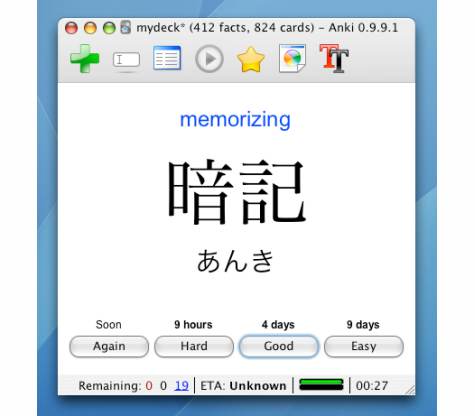
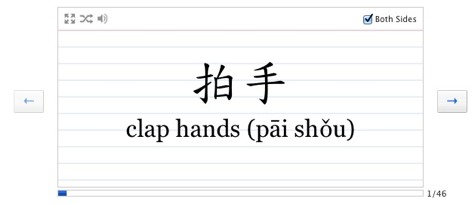
Anki is a free, open source, flashcard program that is the best method I have used for memorization. I originally found it when I was looking for a better way to study for an EMT class. I quickly discovered one of the coolest features of Anki was the database of shared “decks” you can download for free. As it happens, another EMT student had already gone through the trouble of composing a deck that covered all of the material thereby saving me countless hours. The range of topics is astonishing but the most popular subjects appear to be languages (Japanese being the favorite) and vocabulary.

The system that Anki uses to order the cards is called “spaced repetition“. It is based on an algorithm that uses how you rank each card to determine when it will show that particular card in order to maximize retention (and save time). The harder you rank the card the sooner the information reappears, and vice versa. This technique was first pioneered in the popular flashcard generator SuperMemo ($60), and is also used by Mnemosyne (free). Anki also has a slick informatics feature enabling it to produce statistics and graphs detailing how you have been learning over time. Another benefit is that you get to decide the pace of learning by setting the amount of new information introduced every session. I personally chose Anki because of the availability of community-sourced decks and have been thrilled with it so far. However, I am interested in exploring the other options as my studying increases.

Anki currently supports text, LaTeX, images, and sound, and though I haven’t created many decks the process is easy and is helped by a clean user interface. It allows you to share your created decks, and offers the option to upload them to the Anki website where you can access the cards anywhere with an internet connection (and sync them across multiple computers). A downloadable version of Anki is supported on all the major operating systems (OSX, Windows, Linux) as well as iPhone, Android and Nintendo DS. In the end, Anki is one of the best pieces of free software I use, and I highly recommend it to anyone in need of a better study tool.

-- Oliver Hulland  

Anki
Free

Sample Excerpts:

anki2.jpg

*

anki3.jpg

*

anki4.jpg


Teach Your Child to Read

teach-reading1sm2.jpg

This book really works! My daughter could read at age three, and has now really discovered the joy of reading at a young age. There are so many skills that kids can learn for themselves once they master reading. This is truly one of the fundamentals that is worth the effort to instill as early as possible.

-- James Hom  

Teach Your Child to Read in 100 Easy Lessons
Sierfried Engelmann, Phyllis Haddox, Elaine Bruner
1986, 395 pages
$15

Available from Amazon

Sample Excerpts:

The following are the four most important points about an effective sequence for teaching reading:

1. The beginning exercises are simple and do not resemble later exercises (just as beginning piano exercises do not look much like advanced ones).

2. The program provides teaching for every single skill that the child is expected to use when performing even the simplest reading exercises.

3. The exercises change form slowly, and the changes are relatively small, so that the exercises are always relatively easy for the child.

4. At every step, the program provides for very clear and unambiguous communications with the child.

*

To decode the sentence Ruf unter glop splee, you simply say the words. This illustration points out that you may be able to decode without understanding what the sentence means. Traditional reading programs typically confuse the beginning reader about whether the teacher is trying to teach decoding or understanding. These programs typically begin with the teacher discussing the details of a picture. If the pitcure shows a girl named Jan, the teacher talks about Jan—what she is wearing, the color or her hair….It might seem that this communication is effective because it promotes interest and gives the children the motivation for both reading and understanding the written message. However, this communication may prompt the child to formulate a serious misconception about how to read. If the teacher always talks about the picture before reading the word, and if the word is always predictable by referring to the picture, the child may reasonably assume that:
- You read words by referring to a picture.
- You must understand the word that is to be decoded before you can read it.

*

English, clearly, is not a regularly spelled language. It is an amalgam of contributions from Latin, Greek, and French. But there are ways to simplify it for the beginning reader.

Distar solves the problem by introducing an altered orthography. This orthography does two things. It presents variations of some symbols so that we can create a larger number of words that are spelled regularly (each symbol only having a single sound function). At the same time, the orthography permits us to spell words the way they are spelled in traditional orthography. Here is the Distar alphabet:

teach-reading2sm.jpg


Oven Stick

ovenstick.jpg

As I’ve been baking bread regularly these days, this tool has been surprisingly handy. An oven mitt, pot holder or kitchen towel of course works fine for pulling oven racks out, and pushing them in, without getting burnt, but this tool is just agile enough and more convenient that I reach for it every time.

ovenstick2sm.jpg

Alton Brown calls it an “oven fish” and recommends it in his excellent baking book, I’m Just Here for More Food. He carved his out of a broomstick. If you already have a Carvin’ Jack, a cheap wooden ruler would also be a good starting point. Don’t dismiss this simple gadget just because it’s frequently given away as a promotional item. It’s actually useful.

-- Elon Schoenholz  

Oven Stick
Free to make yourself
or $4

Available from Amazon