Once a week we’ll send out a page from Cool Tools: A Catalog of Possibilities. The tools might be outdated or obsolete, but the possibilities they inspire are new. Sign up here to get Tools for Possibilities a week early in your inbox.
The endless summer
Work Your Way Around the World, $6 It’s many a graduate’s dream — pay your way as you travel around the world. I lived the dream myself when I was younger, so I know it is possible. Since then I’ve been tracking this subject faithfully, and have read through scores of books and websites offering how-to advice on the dream. They won’t hurt, but this fantastic book — now in its 14th edition! — is really the only one that will give you much help before you leave.
Most of these kind of books are a bunch of hand-waving generalities, or out of date particulars; this one is very specific and very current. It is massively researched, with tons of incoming gossip on where the easily-gotten jobs are this year, and what to do about paperwork and visas in that particular place, and how to land the job, and what you should expect, and letters from those who just did it. It’s all very helpful, practical and inspiring. But don’t get your hopes too high. There are really only two kinds of dependable quick jobs to be found “around the world”: 1) In the service industry in Europe — working at hotels, resorts, bars, camps for other tourists; and 2) teaching English in Asia. For most kids, that’ll be enough. There are hundreds of exceptions to these two, and this book will do its best to point you to them, but they are far fewer, and more dependent on chance. But even that skill — cultivating chance — is tackled with great intelligence in this meaty book, which I can’t recommend too much.
The author Susan Griffith is very prolific and at the center of a number of other related ongoing books, also recommended: Teaching English Abroad, Your Gap Year, and Summer Jobs Worldwide. – KK
How to sell your crafts
The Handmade Marketplace, $13 The giant crafts website Etsy makes it easy to list homemade stuff to a potential audience of millions. But the hard part is getting anyone to pay attention and actually buy it. That requires some basic business and online marketing skills, which are reviewed here, with the home crafter in mind. – KK
What best advice would you offer a crafter who is looking to gain national attention for their work? Invest in great product photography. Great work sells itself, so you need to do everything possible to make sure the beauty of your work comes through in a way that’s apparent to people reading about you online or in print because most people won’t see your work in person.
Are you getting some really great feedback about something in particular that you’ve made? Consider posting these compliments in the description of your item.
Keep these customer service practices in mind at all times: The customers may not always be right, but they do deserve your full attention and respect regarding the matter at hand. Apologize first. What if you didn’t do anything wrong? you may ask. Well, while that may be the case, that’s not really the point. You can, in fact, regret that your customer is upset in any regard. Simply recognizing that your buyer has a problem and has had to take the time out of a busy day to alert you to it is reason enough to apologize. Ask what will make the situation right. If what the customer wants is reasonable and you can do it, you should consider it. Taking a hit on a sale is a small price to pay when it comes to your overall reputation and the trust you are trying to build with your market.
Everyone is in sales
To Sell is Human, $16 Dan Pink argues that hard selling no longer works as it once did; what we need in this new information economy is soft selling. Soft sales are not just for sales people; everyone now is in the business of selling. Soft persuasion techniques are useful to anyone sending an email, writing a resume, doing a kickstart project, even twittering. A seller – either professional or citizen – can no longer rely on the old tactics such as “overcoming objections” and “closing an offer” but must shift to new skills such as improvisation, attunement, and service. Pink arrives at the radical idea that selling well makes us better humans, and better humans sell better. This book accomplished two things: it persuaded me that I am in sales, and it gave me some new tools for gently selling what I have to offer. – KK
Successful negotiators recommend that you should mimic the mannerisms of your negotiation partner to get a better deal. For example, when the other person rubs his/her face, you should, too. If he/she leans back or leans forward in the chair, you should, too. However, they say it is very important that you mimic subtly enough that the other person does not notice what you are doing, otherwise this technique completely backfires. Also, do not direct too much of your attention to the mimicking so you don’t lose focus on the outcome of the negotiation. Thus, you should find a happy medium of consistent but subtle mimicking that does not disrupt your focus.
After someone hears your pitch … 1. What do you want them to know? 2. What do you want them to feel? 3. What do you want them to do? If you’ve got strong answers to these three questions, the pitch will come together more easily.
One way to do better is with what I call “emotionally intelligent signage.” Most signs typically have two functions: They provide information to help people find their way or they announce rules. But emotionally intelligent signage goes deeper. It achieves those same ends by enlisting the principles of “make it personal” and “make it purposeful.” It tries to move others by expressing empathy with the person viewing the sign (that’s the personal part) or by triggering empathy in that person so she’ll understand the rationale behind the posted rule (that’s the purposeful part).
Become a Patron!Support our reviews, videos, and podcasts on Patreon!
Cool tools really work.
A cool tool can be any book, gadget, software, video, map, hardware, material, or website that is tried and true. All reviews on this site are written by readers who have actually used the tool and others like it. Items can be either old or new as long as they are wonderful. We post things we like and ignore the rest. Suggestions for tools much better than what is recommended here are always wanted.
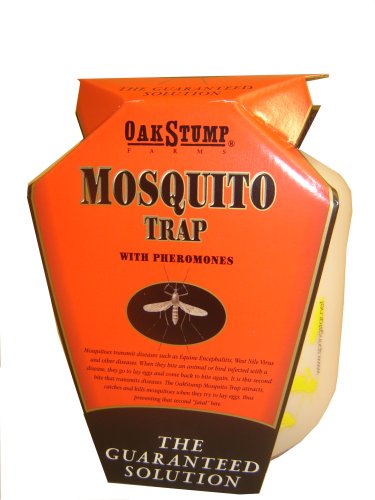
When I saw this cheap trap at Logan’s Trading Post three years ago, I figured what-the-heck, but we’ve been amazed at how effective they are. About three fourths of the way up from the bottom of the jug a tube runs through a hole in each side. Fill the jug with water up to the bottom of the transverse tube, add a pheromone pack, let it sit for a week with the top off (to make sure it gets the right attention), then close it after topping the water off. The mosquitoes fly into the tube and lay their eggs. When they hatch, the little mosquitoes can’t figure out how to get out. With luck, in about three weeks the trap will literally be swarming with skeeters.
We empty ours once a year and add new water once a month or so; as long as you break the breeding cycle early enough in the spring it’s not a big deal if you forget to water them later in the season. On our quarter-acre lot, I’ve found that three traps is plenty. So far this season, I haven’t seen a single mosquito (except for the two or three I let out when I opened up one of the traps to top it off w/water). Only one of the three traps have looked really busy this year (last year, it was two of three).
We don’t get many bugs inside. We live in an 1872 farmhouse, so we do get the occasional palmetto bug, but never up so high as to need the Bugzooka. However, living as we do, in the North Carolina piedmont, we’re plagued by mosquitoes; particularly the new “Asian Tiger” mosquitoes, which leave me and my sweetheart itching and inflamed for days after working in the garden or yard. We tried the “propane to human breath” machine (the Mosquito Magnet) for a year or so, and it simply didn’t catch any mosquitoes. The fan was not powerful enough to suck in the little buggers, so the mesh bag they said would be full of bugs was full of dust and pollen. We tried the doughnuts you’re supposed to dunk in places (like gutters) where water stands from time to time, and they didn’t help. We drilled holes in all of our trashcans and recycling bins, but they still bred mosquitoes. We heard about services that will spray some sort of natural insecticide all summer long, but they were too expensive.
With these traps, we can now work in the yard or garden or sit on our porch — one of the small joys that defines Southern living — without fear. — Steven Champeon
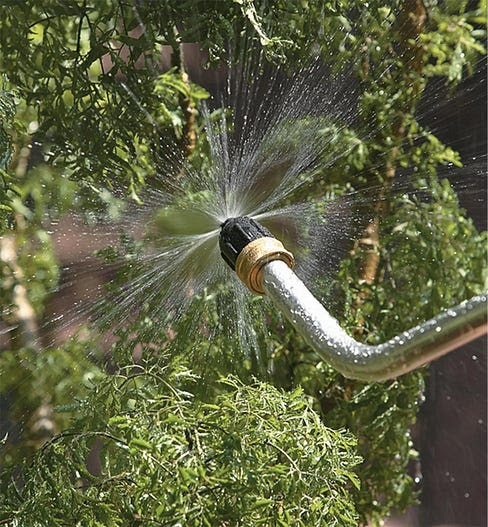
The Bug Blaster is a great insect control tool for the garden. It is completely organic–it only uses the force of water. I have used the tool for three years and love it. You just attach it to your hose and turn it on. The water is forced out a tiny hole and guided in such a way that it comes out in a fine spray that is a flat circle. Stick the nozzle in your plants and it knocks all the insects and eggs off, those below the leaves and those above.
Every gardener knows you can remove aphids by hosing the plant, but it is difficult to get the ones under the leaves. On delicate new growth, the hosing can injure the plants. But the Bug Blaster has such a fine, controllable spray that it cleans the plants of all the pests and doesn’t harm the plants. The good insects are usually hard shelled and aren’t injured. Since I bought this tool I haven’t used any other pest control method. — Terry Powell
In the 1970s British bus driver Ken Fern went back to the land. Twenty-five years later he published the first edition of this now-revised compendium, a catalog and guide to a staggering number of mostly-perennial plants that can be harvested for food and other uses. Literally, thousands of seed, root, fruit, flower and leaf crops from a range of bulbs, trees, shrubs, climbers, bamboos, water plants and more. Beyond climatic needs and appearance, plants are described in terms of their taste and, often, highly-specific use (e.g. Asarum canadense. SNAKE ROOT: “a ginger substitute in flavouring cooked foods.”). The index is conveniently broken up into edible uses, like condiments and egg and salt substitutes, and non-edible uses, like basketry, disinfectant, and tooth care; For more, check out 100 Other Uses. And actually, the Plants for a Future web site offers a searchable database of 7,000 plants. While much of the info from the book is available online, the printed format can be easier to parse and digest. There are sections on “green manures” and how to mulch with cardboard boxes or newspaper and straw, as well as how to make a pond. Despite all the ideas and potential outlined in the book, the final chapter, “Future Possibilities,” truly emphasizes the magical allure of cultivation and experimentation. — Steven Leckart
Most organic gardeners, when confronted by a heavily weed-infested site, will reach immediately for the fork or spade and spend many hours laboriously digging out as many weeds as they can. Not only is this exceedingly hard work, but it is often far less than successful. Many of the weeds, such as couch grass or thistles, will soon regrow with renewed vigour if even small parts of the roots are left in the ground. There will also usually be an explosion of germination from literally millions of seeds that have been given ideal germination conditions. The newly-dug ground will very soon be covered in weeds again. The alternative, once more, is to mulch. But this time there must be some organic barrier placed below the mulch to prevent all the weeds from growing through. We have found that cardboard boxes are an ideal barrier to use. They are usually freely available in quantity from local shops, etc., will form an excellent barrier for a year or so, in which time most of the persistent weeds will have died, and then will rot down nicely to add their own organic matter to the fertility of the soil. Other materials that can also be used include newspapers (but try to avoid to many with colour printing and do not use colour supplements on land where you intend to grow food) and carpets (but only those made of natural materials such as hessian -- avoid foam-backed carpets). It is very important to ensure that you apply a sufficient thickness of barrier mulch, otherwise the more vigorous weeds such as thistles and docks will push their way through it. A carpet that is not too worn is usually sufficient, carboard boxes folded flat but not opened out are generally enough, and newspapers about 15 sheets thick are also adequate. make sure that the edges of the boxes or whatever overlap by at least 8 cm, otherwise the weeds will soon find their way to the surface. Autumn and early winter is the ideal time to mulch weed-infested beds, though it can be done at any time of the year so long as as the soil is not dry.
I use this monthly to troll for the best in the art and science of gardening. Each month editors Greg and Pat Williams extract the meatiest, handiest, most practical innovations in vegetable, fruit and flower horticulture. They tirelessly glean material from obscure ag-extension bulletins, garden club newsletters, seed catalogs and dusty journals, reading it all so you don’t have to, and translating it into clear English so you can use it. They run no pictures, no ads; only concepts, tools, and techniques. It’s sort of like a Cook’s Illustrated for your garden — the advice is based on scientific testing, and the tools born out of genuine need.
The newsletter is emailed as a PDF file. Because HortIdeas reports “news that stays new”, I recommend the nifty CD of all their back issues. This humble yet intelligent newsletter is an amazing service which should appeal to anyone with a love of perfecting what is possible. — KK
Ohio State University horticulturists have been evaluating underutilized low-growing willows (Salix species) for their ornamental potential and hardiness. They gathered around 200 willows from a variety of international sources…. Several of the low-growing willows have interesting ornamental features and appear to be excellent candidates for use in small-scale gardens in the Midwest. Some are well-suited to container-growing. We hope that commercial nurseries become interested in propagating and marketing some of these trees! According to the OSU horticulturists, because of extreme variability among seed-propagated willows, it is imperative that individuals with unique qualities be propagated vegetatively
Several years ago, there was considerable interest in adding hydrogen peroxide to irrigation water to enhance oxygen in the root zones of plants. At the time, some investigators reported increased crop yields with hydrogen peroxide, but, as far as we know, no commercial apparatus was developed. Perhaps the results of recent experiments conducted in Australia will rekindle interest in oxygenated irrigation systems. The Australian researchers injected 0.6 pints per 1,000 square feet of 50% hydrogen peroxide solution via subsurface drip irrigation tape into heavy clay plots following flooding of the soil. Zucchini plants grown in the plots produced 29% more fruits weighing 25% more than the fruits produced without hydrogen peroxide treatment. The researchers also tried injecting hydrogen peroxide at a rate of 0.1% by volume with the irrigation water provided to container-grown vegetable soybean plants in “heavy cracking” clay soil that was kept water-saturated. Yields of soybean pods (fresh weight) went up by 82-96% relative to the yields with no hydrogen peroxide. Clearly, oxygenated irrigation is a highly promising way to boost production of crops growing in waterlogged heavy clay. We believe there could be a substantial market for a mechanismthat automatically injects hydrogen peroxide into drip irrigation systems.
Moss loves buttermilk and beer. Where did this “old school” formula of mixing moss fragments with buttermilk and/or beer in the family blender come from, and does it work? Moss craves acidic conditions which buttermilk and stale beer provide. While the “moss think tank” at Moss Acres prefers some less odorous methods of preparing a moss shake/slurry, this oft-prescribed method has about a 60% success rate when the moss fragments are kept consistently wet. Al Benner, president of Moss Acres, says: “Our customers tell us the applications for moss are expanding. Moss has always been ... popular ... in Asian gardens, rock gardens, water gardens, and shade gardens. But every day we are helping clients use moss for creative projects such as interior landscaping, stone walls, and moss roofs.”
The researchers conclude that the results of the storage trial show that high storage temperatures—apparently achievable simply by having a fairly large pile, without periodic turning— can speed destruction of pathogenic bacteria in solid manures. They also warn of the potential dangers of consuming produce harvested soon after applying fresh manure.
Once a week we’ll send out a page from Cool Tools: A Catalog of Possibilities. The tools might be outdated or obsolete, and the links to them may or may not work. We present these vintage recommendations as is because the possibilities they inspire are new. Sign up here to get Tools for Possibilities a week early in your inbox.